Zero-Cost Engineering
An adaptive workflow, rooted in responsibility, that inspires innovation, embraces an entrepreneurial mindset, and keeps the process fun—delivering professional results without the burden of licensing costs.

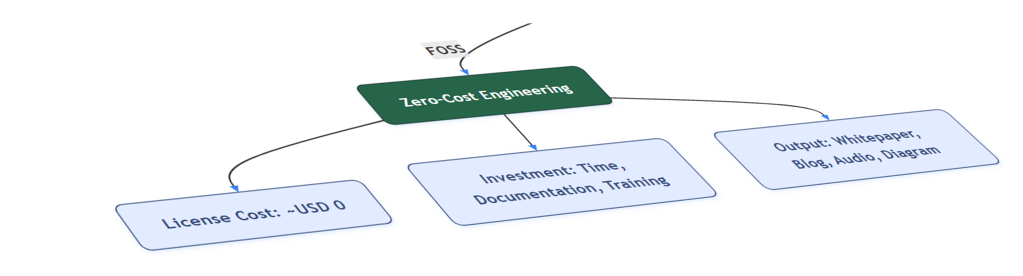
Leveraging FOSS Workflows for Professional Technical Outcomes
Written by Ketut Kumajaya | August 10, 2025
"Why pay thousands in software licenses when you can achieve the same — or better — engineering results for free?"
In industrial environments, technical analysis and documentation are often perceived as dependent on costly software licenses and proprietary platforms. Yet, professional-grade results can be achieved without such overheads. Zero-Cost Engineering is a methodology built around Free and Open Source Software (FOSS), enabling reproducible, audit-ready technical outputs while maximizing operational efficiency. This is not just theory — it is been proven in the field.
A Practical Engineering Mindset
Zero-Cost Engineering is not about cutting corners; it is about making the most of available tools and investing in a deep understanding of the process.
The approach revolves around:
- One language for everything → Python
- One editor for everything → Visual Studio Code + Jupyter Notebook
- One documentation flow → Markdown + Ghost CMS
- One goal → Reproducible, modular, and audit-ready technical output
This framework promotes transparency, scalability, and collaborative efficiency — ensuring technical outputs meet both operational and compliance expectations.
End-to-End Workflow Using FOSS
Data Digitization
- Input: Vendor performance curves (PDF/JPEG/PNG)
- Tool: WebPlotDigitizer
- Output: Numerical dataset extracted from static images
- Commercial alternative: OriginLab Digitizer, MATLAB Toolbox
Analysis & Visualization
- Tool: Python (pandas, numpy, matplotlib)
- Output: IGV vs. pressure/flow graphs, efficiency zones, actual operating points
- Commercial alternative: MATLAB, OriginPro, JMP
Modular Content Drafting
- Tool: Markdown in VS Code or Joplin, diagrams with Mermaid, schematics with draw.io
- Output: Clean, modular technical manuscript ready for conversion
- Commercial alternative: MS Word + EndNote + Visio, Adobe FrameMaker
PDF Conversion & Layout
- Tool: Pandoc (Markdown → LaTeX) + Overleaf
- Output: Print-ready whitepaper PDF
- Commercial alternative: Adobe InDesign, Scientific Word
Audio Narration
- Tool: Python TTS (pyttsx3, gTTS)
- Output: Technical narration for presentations or podcasts
- Commercial alternative: Adobe Audition + TTS API
Distribution
- Tool: Ghost CMS (self-hosted) + PDF
- Output: Public blog post and technical whitepaper
- Commercial alternative: Enterprise CMS + Adobe Acrobat Pro DC
Real-World Application: Centrifugal Compressor Diagnostics
This workflow was applied to diagnose a centrifugal compressor that failed to achieve its pressure target. Using only FOSS tools:
- Operational issues were identified and validated without proprietary platforms.
- Recommendations were derived from independently digitized and visualized performance curves.
- Final outputs included a public blog post and a reproducible whitepaper — crafted entirely with open and free tools.
This demonstrates that with a well-structured process and adaptive use of technology, technical teams can maintain high standards, respond quickly to challenges, and optimize resources for greater impact.
As the case study demonstrated, with just one laptop, one language, and one editor, it is possible not only to save costs but also to build a working ecosystem that is testable, shareable, and collaboratively expandable. This mindset ensures that every deliverable — whether a diagnostic report, a whitepaper, or a blog post — is reproducible and ready for peer validation.
Workflow Diagram
The following diagram is rendered directly using Mermaid — not a graphic produced by external or paid software, but a text-based visualization that can be reproduced and revised instantly.
(WebPlotDigitizer)"]:::Sky B["Analysis & Visualization
(Python: pandas, numpy, matplotlib)"]:::Sky C["Writing & Manuscript
(Joplin, Ghost, Mermaid, draw.io)"]:::Sky D1["Blog Post
(Ghost CMS)"]:::Sky D2["Whitepaper PDF
(Pandoc + Overleaf)"]:::Sky D3["Audio Narration
(Python TTS)"]:::Sky end A --> B B --> C C --> D1 & D2 & D3 D1 --> E["Final Distribution"]:::Pine D2 --> E D3 --> E classDef Sky fill:#F4F8FF,stroke:#2C3E50,color:#2C3E50,stroke-width:1.5px,rx:6px,ry:6px; classDef Pine fill:#2E8B57,stroke:#1E5F3F,color:#FFFFFF,stroke-width:1.5px,rx:6px,ry:6px; classDef Alert fill:#FFF5F5,stroke:#D32F2F,color:#D32F2F,stroke-width:1.5px,rx:6px,ry:6px; style Workspace stroke:#757575,fill:#F5F5F5,rx:8px,ry:8px
One of the strengths of this workflow is its ability to incorporate advanced technical expressions directly into the publication flow. Using FOSS tools such as \({\LaTeX}\), complex engineering formulas can be rendered with professional quality.
For example:
This ensures that scientific documentation remains precise and presentation-ready without relying on commercial equation editors.
Decision Flowchart
Comparison Table
| Stage | FOSS Tools | Commercial Alternatives | Estimated Annual Cost |
|---|---|---|---|
| Data Digitization | WebPlotDigitizer | OriginLab, MATLAB Toolbox | USD 500–2,000 |
| Analysis & Visualization | Python | MATLAB, OriginPro | USD 1,000–2,500 |
| Content Drafting | Markdown + Joplin | MS Word + Visio | USD 150–1,000 |
| PDF Conversion | Pandoc + Overleaf | Adobe InDesign | USD 250–1,200 |
| Audio Narration | Python TTS | Adobe Audition + TTS API | USD 200–1,000 |
| Distribution | Ghost CMS | Enterprise CMS + Acrobat Pro DC | USD 200–600 |
| Total Estimate | ~USD 0 | USD 2,300–8,300 |
Closing Perspective
When I first began using Linux in the year 2000, I dreamed of a future where open-source tools would become the backbone of industrial and engineering workflows. Two decades later, Zero-Cost Engineering stands as proof that this vision is not only possible — it’s happening.
Zero-Cost Engineering is more than a cost-optimization strategy — it is a disciplined, forward-looking approach that builds transparent, modular, and reproducible technical ecosystems. By combining rigorous analysis with adaptive thinking, teams can deliver complex engineering outputs that match or exceed those produced with commercial software, while strengthening operational resilience and enabling continuous improvement.
Beyond the core workflow, this philosophy is reinforced by a broader ecosystem of open-source tools, enabling seamless integration across industrial, analytical, and operational layers. This includes Rapid SCADA for industrial monitoring, Node-RED for workflow automation, 4diac FORTE for IEC 61499 control, RutOS/OpenWrt for edge device management, Grafana and Metabase for data visualization and analytics, ZeroTier for secure virtual networking, and mbusd for Modbus TCP/RTU communication. Gateway and IIoT nodes are typically built on Debian — or Ubuntu — based systems, ensuring stability and community-driven support. Together, these components demonstrate the practical application of FOSS principles in building scalable, transparent, and cost-efficient industrial solutions.
"Ready to try Zero-Cost Engineering? Use these FOSS tools and start your project with maximum efficiency."